¶ The PBC Bot
A bot of our very own! The PBC Bot is available for use in Slack with various functionality.
For an issues with the bot, or it's functionality contact Kevin directly via Slack.
¶ Bidding on SPBC players using PBC Bot
One of the main features of the PBC Bot is the ability to silently bid on SPBC players. All bids must conform to bidding rules outlined in Rule 3.6.3.
¶ Creating a Bid
In order a place a bid for a player, use the /bid command in either the #request-commish-action channel, or in a direct converastion with the PBC Bot. All bids are submidded blindly, so regardless of where you enter the command, your bid will not be visable to other GMs.
The /bid command should contain commpontents:
- The first and last name of the player you wish to bid on
- The amount of money you wish to bid
For example, if I wish to bid on a player named Jose Martinez for $20,000 I can structure my bid as follows:
/bid Jose Martinez 20000
Bids are only allowed against active SPBC players. If the player you bid on is not an active SPBC player, you will recieve an error.
The amount of money you wish to bid can be entered in a variety of ways:
100k, $100,000, 0.1m, 100000 ...will all be logged as a $100,000 bid.
In the event that mutiple players match the name provided, you will be asked to select which player you would like to place the bid against.
¶ Confirming a Bid
When creating a new bid, you will be asked to confirm the player and amount of money you have submitted:
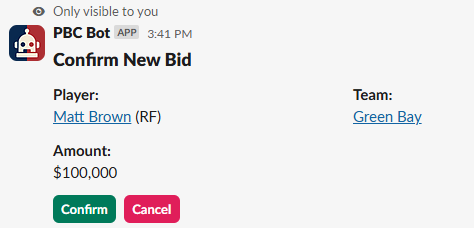
Review this dialog. If the player and value look correct, select the confirm button. Otherwise, cancel the bid.
¶ Increasing a Bid
If you already have a bid placed against a player and you wish to increase the bid value, simply use the /bid command again, with the player and the value you wish to increase your bid to.
Subiquent bids against the same player by the same GM must be higher in value than the inital bid. If you attempt to bid on a player where an active bid exists, and your new bid is of lower value, you will recieve an error.
¶ Viewing my Active Bids
Active bids for a GM can be viewed by entering the /get-my-bids command.
¶ All Commands
Commands can be entered in #request-commish-action channel, or in a direct message to the PBC Bot.
¶ GM Commands
/bid [first, last, amount] - allows the user to bid on SPBC players.
/refresh-players- manually refreshes the database of players
/get-my-bids - returns a list of your active bids
/player [first, last] - search for player by First/Last name.
/player-id [ID#] - search for player by player ID.
¶ Commishioner Commands
Commishioner commands are only available for privileged accounts.
/get-all-bids - returns a list of all active bids against players to the #request-commish-action channel
/clear-bids - sets all bids to inactive. to be used after bids have been processed.
/refresh-teams - manually refreshes the database of teams